
Revisit the session
Session replay allows us to see the whole training, uploading up to 6 tracks, and helps us find what you noticed on the water.
CONTEXT
SailVector is the analysis tool I developed to support the coach. The idea is to provide a good data analisys in a more affordable way.
Every session contains many signals. The value lies in choosing the ones relevant to your technical question and discussing them together.
SailVector helps revisit legs and manoeuvres, observe consistency and make comparisons more concrete.
Session replay allows us to see the whole training, uploading up to 6 tracks, and helps us find what you noticed on the water.
CONTEXTFollowing speed through a manoeuvre and its recovery helps identify moments worth a closer look on video. VMG, and upwind/downwind gathered distance will complete the observation.
DETAILDifferences between legs and repeated exercises become training prompts, interpreted alongside the wind and session conditions.
COMPARISONVisuals and summaries make the debrief easier to follow and help define what to try again next time.
PROGRESSFollow two tracks side by side, with speed, VMG and course angle to the wind shown as the replay progresses.
 View full-size image
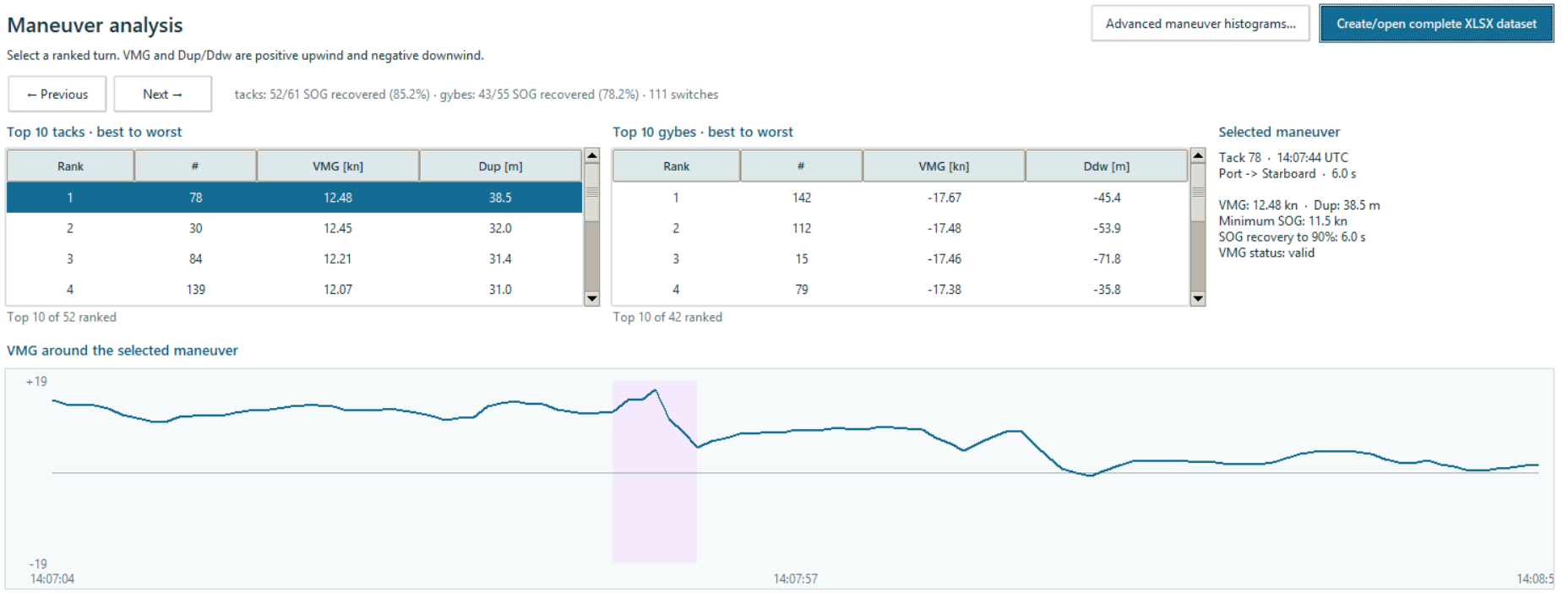
Compare ranked tacks and gybes, then inspect VMG and speed recovery around the selected manoeuvre.
SailVector is used within coaching and guided debriefs. This website shows a replay video and an analysis screenshot; I've already set a function to download the replay and create a report with all the relevant data. This is included in any package involving SailVector.
SailVector can be adapted to any sailing class if needed. The coach adapts the analysis to the discipline, training question and available data. We can also set different rules to personalize the analisys.
Analysis quality depends on the recording and context. GPS describes movement over the ground; wind, current and sea state require interpretation and not currently modeled. In case of need any gpx track from any smartwatch can be used.
A debrief focused on the agreed moments and, where included in your programme, a summary of results. The format is chosen to suit your training. As said before,
MAKE MORE OF YOUR SESSION